
Mail merge for Gmail
Send personalized mail merges from Gmail in 3 steps
Don’t waste time sending individual email messages. Create and send mail merge campaigns directly from Gmail with Yet Another Mail Merge (YAMM).- 1
Prepare your mailing list in Google Sheets
Create your Google Sheets with your mailing list. You can even automatically import contacts from Google Contacts.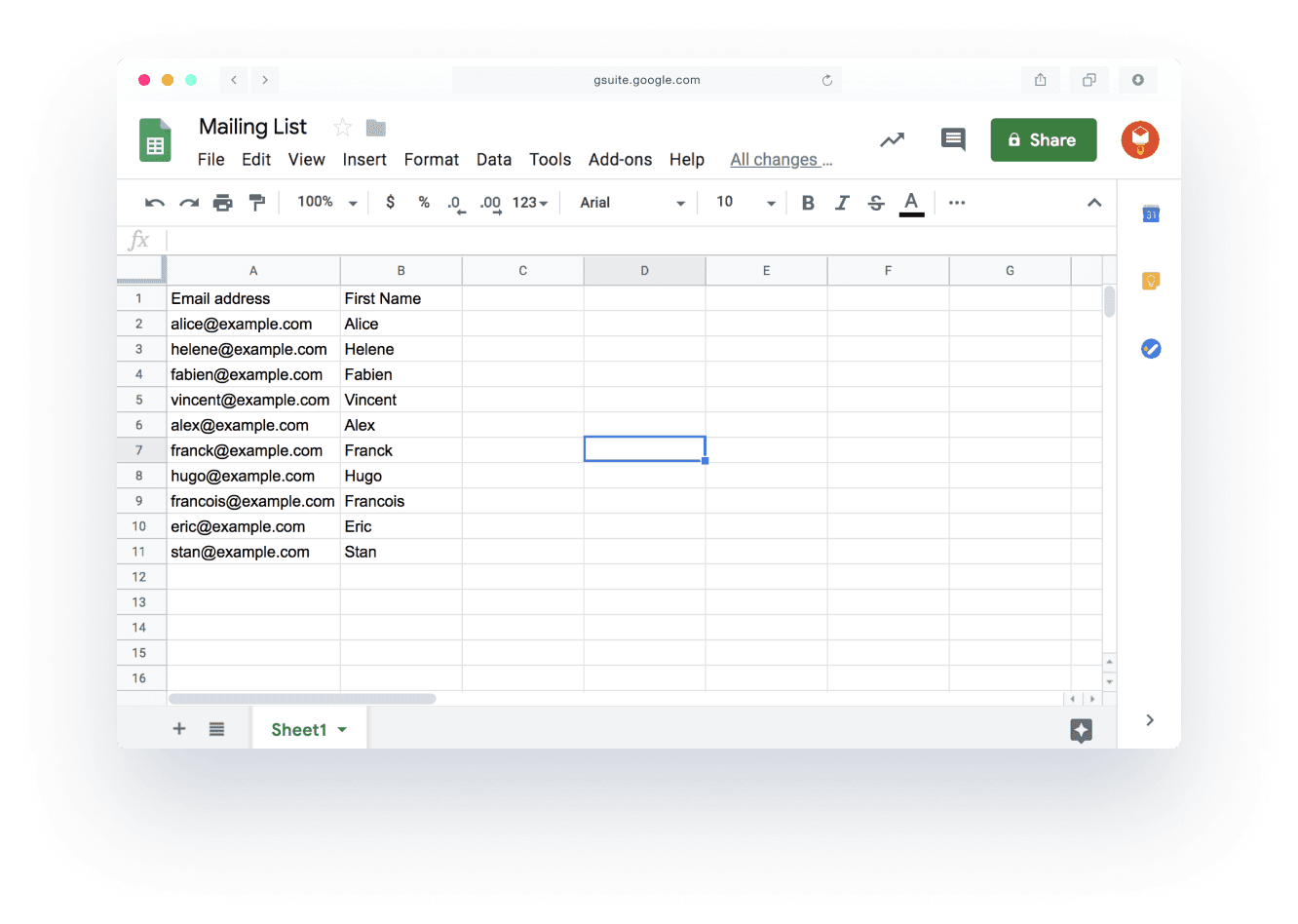
- 2
Create your email template in Gmail
Choose an email template, create a draft, write your content and subject line, add personalization, and save it.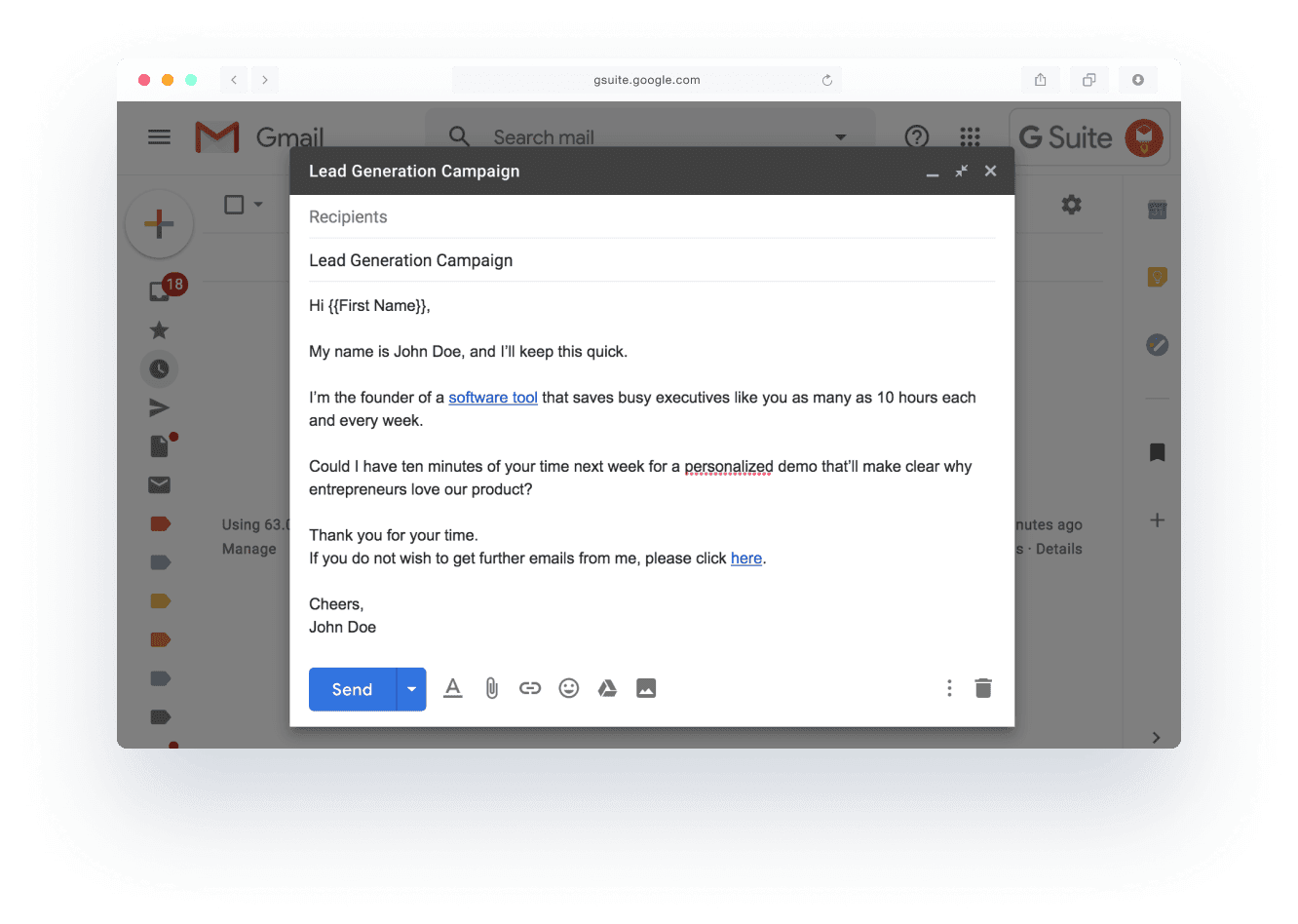
- 3
Send and track your campaign with YAMM
Return to Google Sheets, open Yet Another Mail Merge, and send. You'll be able to track email open rates, clicks, replies, and bounces to know what to send next.Follow our quick tutorial to get started!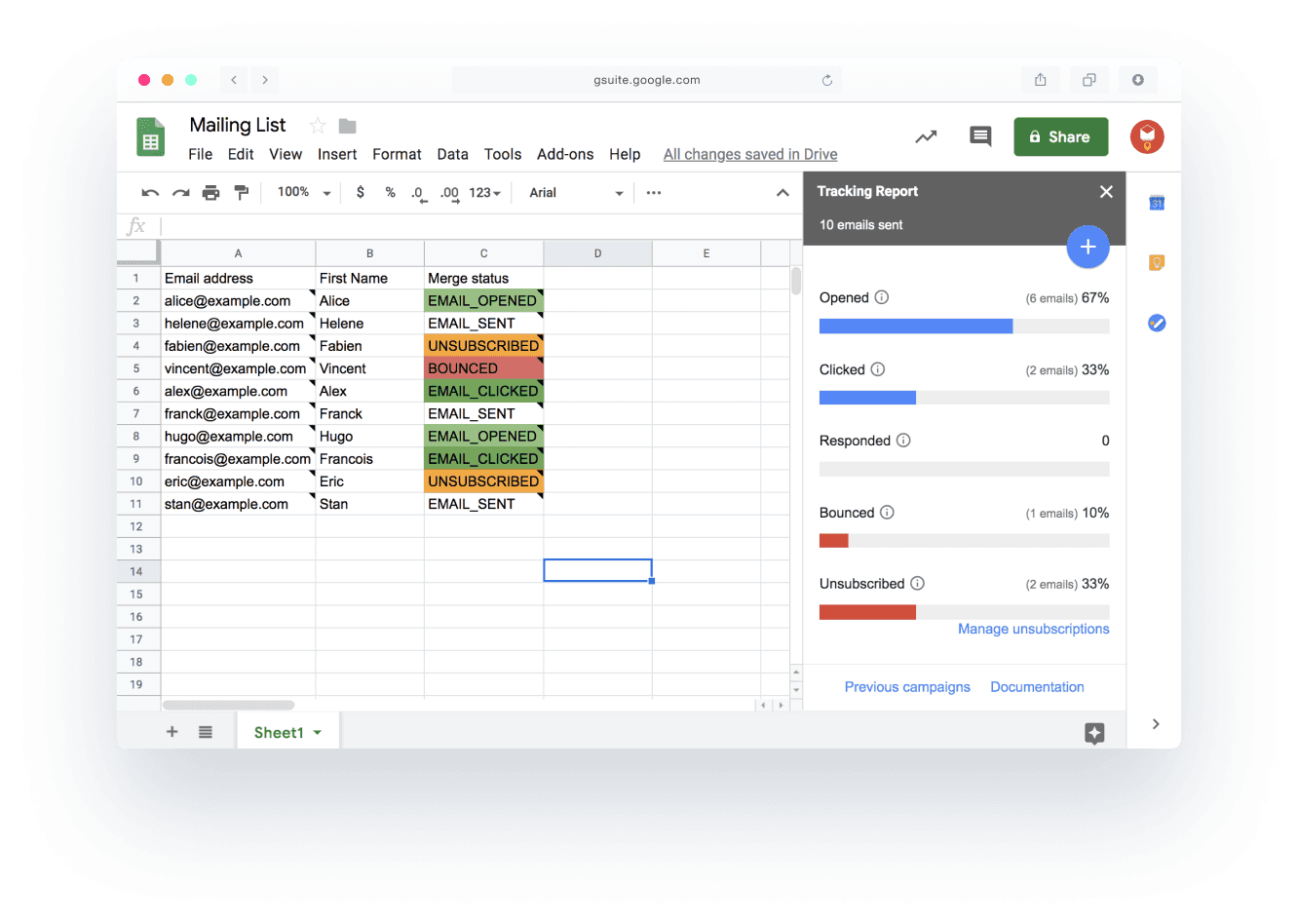
Easily send personalized email campaigns from Gmail

Increase engagement & grow your business with Yet Another Mail Merge
Get more responses, more leads, and more engagement with personalized lead generation campaigns, event invitations, promotions, email newsletters, surveys, and more.
Lead generation
Improve your lead gen processes with YAMM. Easily import email addresses from Google Contacts or your CRM, including Salesforce, Hubspot, and Copper, then send personalized emails to generate more sales opportunities.See what our customers say about YAMM...
...and about our best-in-class support










Mail Merge:
Overview, How to Do It, Types, Advantages, and Disadvantages
Mail merge is a technique used to generate personalized documents such as letters, envelopes, labels and emails by combining a document template with a database containing the recipient's information. Businesses and organizations often use this method to send customized mass mailings, saving time and effort while reducing the chances of errors and duplications.
There are two methods for mass communication distribution: bulk email and mail merge. The main difference between the two is that mail merge allows for more personalization and customization of the message. Bulk email delivers the same message to multiple recipients, and is often used for newsletters and marketing campaigns. In contrast, mail merge combines an email template with recipient data from a spreadsheet for personalized documents like letters and labels. Mail merge allows for high customization, making it suitable for tailored invites, contribution requests, and thank-you notes.
Mail merge encompasses three primary types: directory mail merge, email mail merge, and document mail merge. Mail merge can be used to personalize various kinds of emails, depending on the email marketing goals. Examples of using mail merge for different types of emails include promotional emails, transactional emails, curated content emails, newsletter emails, and discount emails.
To create a mail merge, follow these five steps:
- Prepare your mailing list in a spreadsheet. Name one of the columns Email and list any other information you want to use about your contacts in additional columns, e.g. email recipient names.
- Create your email template in Gmail. Choose an email template, create a draft, write your content and subject line, add personalization using markers that match the names of your spreadsheet columns.
- Launch the merging process. From your spreadsheet, open your mail merge extension. It will make you select the email template you want to use and indicate other information about your mailing campaign.
- Test your email. Mail merge tools like YAMM offer a testing feature before your email is sent to a large number of recipients. Use it to ensure the email personalization works correctly.
- Send and track your mail merge. After checking the email, send it to the recipient list. Your spreadsheet will then automatically indicate email open rates, clicks, replies, and bounces.
Advantages of using mail merge include improved tracking, personalization, time-saving, cost-effectiveness, and better accuracy. However, there are also disadvantages, such as limitations, spam risk, a learning curve, and potential technical issues. A number of issues may arise from user mistakes as well.

Mail merge is a popular method for creating personalized documents such as letters, envelopes, emails and labels, by combining a template with a recipient information database. It is widely used in businesses and organizations to send tailored mass mailings. The procedure saves time and labor while reducing the possibility of mistakes or duplications. Mail merge for Gmail and Google Sheets is a feature that allows users to merge data from a Google Sheet into a Gmail message, creating customized emails that can be sent to multiple recipients. This functionality is available through third-party add-ons or extensions that can be installed in Google Sheets and Gmail.
Mail merge is a valuable tool for email marketing because it enables businesses to send tailored and targeted emails to their subscribers. By merging data from a spreadsheet or database with an email template, companies can create emails that address recipients by name, contain personalized information based on their interests or previous interactions with the business, and increase the likelihood of engagement.
Another use of mail merge is the mailing of custom attachments. Users can automatically attach relevant files to each recipient. For example, a business could send out customized invoices to multiple clients, each with their respective invoice attached as a PDF. This eliminates the need for manual attachment of files to individual emails, saving time and reducing the risk of errors. Mail merge also allows for dynamic attachments, where different files can be attached to different recipients based on predefined rules, such as customer type or location. This ensures that the right attachments are sent to the right recipients, making communication more efficient and effective.
Typically, the main data source in mail merge is a list of subscribers or customers, including their contact information and other relevant data, such as their purchase history or preferences. This information is used to customize and increase the relevance of the email content for each recipient. The types of emails sent through mail merge vary based on the goal of the email marketing campaign and may include promotional emails, newsletters, event invitations, and follow-up emails.
How to Merge Emails for Gmail Using Google Sheets?
Mail merge is a process that combines data from a spreadsheet or directory with a document or email template to create customized and personalized documents or emails. Google Sheets is part of the Google Workspace suite of productivity tools and allows for online spreadsheet creation, editing, and collaboration. Google Sheets can be used as a data source for mail merge, enabling users to create and send personalized emails to multiple recipients quickly.
Here are five steps to merge emails for Gmail using Google Sheets:
- Create a Google Sheet with the email addresses and any other essential information for the email merge.
- Set up a mail merge add-on for Google Sheets, such as "Yet Another Mail Merge" (YAMM) by opening the Google Sheet you want to use and selecting "Get add-ons" from the menu bar. Search for and install your preferred mail merge add-on.
- Compose the email using the email merge feature in Gmail, including text, images, or links, and add placeholders for data columns from the Google Sheets.
- Connect Google Sheets and Gmail. Launch the mail merge add-on from your Google Sheet and follow the on-screen instructions to link the Google Sheet to Gmail. Select the email you composed in step 3 and confirm the merge settings.
- Merge and send emails. Click the "Merge" button in the add-on to merge and send the emails after confirming the settings. You can either send the emails immediately or schedule them to be sent at a later time.
YAMM, or "Yet Another Mail Merge," is a popular add-on for Google Sheets and Gmail that enables users to mail merge customized emails to a variety of recipients. Users can quickly create a single email template using YAMM, combine it with a list of recipient information, and send personalized emails en masse. Some features and benefits of YAMM include personalization, tracking, customization, automation, and integration.
What is a Placeholder in Email Merge?
A placeholder in email merge is a variable or field within an email template that will be replaced with personalized data from the recipient database or spreadsheet during the merge process. Placeholders are typically identified with specific syntax, such as double curly braces ("{{ }}") or angled brackets ("<< >>").
For example, during the merging process, the mail merge software will replace the {{FirstName}} placeholder in an email template with the actual first name of the recipient. The software ensures that the correct data is included in each email by matching the placeholder with the corresponding field in the recipient database or spreadsheet.
Placeholders in emails can represent various dynamic content, including names, addresses, phone numbers, dates, and other personalized information. Using placeholders in email merge allows for the incorporation of dynamic and personalized information into an email template, enabling the delivery of customized messages to a large number of recipients with minimal effort.
Placeholders can also be called markers or merge tags depending on which email merge software you used.
Are Placeholders Case-sensitive for Mail Merging?
Yes, placeholders in mail merging can be case-sensitive depending on the specific software or tool being used. The placeholders in the email template must match the case of the relevant field in the recipient database or spreadsheet, for instance, if the mail merging software or tool is case-sensitive by default. For instance, in the email template, the placeholder should be written as "FirstName" with a capital "F" to accurately match and input the correct data during the merging process if the database field is also "FirstName" with a capital "F."
However, some mail merging software or tools may not be case-sensitive, allowing placeholders to be written in any case while still matching and inserting the correct information. In such cases, using "firstname," "FIRSTNAME," or "FirstName" as the placeholder will correctly match the "FirstName" column in the database.
To verify if placeholders are case-sensitive or case-insensitive, check the guidelines or settings of the mail merge software or tool. This helps guarantee that your recipient databases and email templates are set up correctly for an efficient mail merge process.
Why is a Google Account Necessary for Gmail Merge?
Gmail Merge requires a Google Account because it is designed to function exclusively with Gmail, which is part of Google's range of services. This feature works like a Google Sheets add-on, allowing users to access and extract data from a Google Sheet before sending emails from their Google account.
Gmail, launched as an invitation-only beta version in April 2004, quickly gained popularity due to its innovative features such as large storage capacity, rapid search capabilities, and a powerful spam filter. Gmail introduced a new approach to email with threaded discussions, simplifying the process of tracking email conversations and replying to messages.
As Gmail became a leading email service provider, its offerings expanded to include Google Drive integration, Hangouts for video and voice chats, and integration with other Google services like Google Calendar and Google Docs.
Today, Gmail is used by billions of people worldwide and serves as an essential tool for both personal and professional communication. The Gmail merge feature through a tool like YAMM is just one of many ways Gmail users can enhance their productivity and efficiency. By connecting with Google Sheets, Gmail merge allows users to easily create and send customized emails to multiple recipients, making it an ideal tool for email marketing campaigns, sales outreach, or any other use case requiring personalized emails.
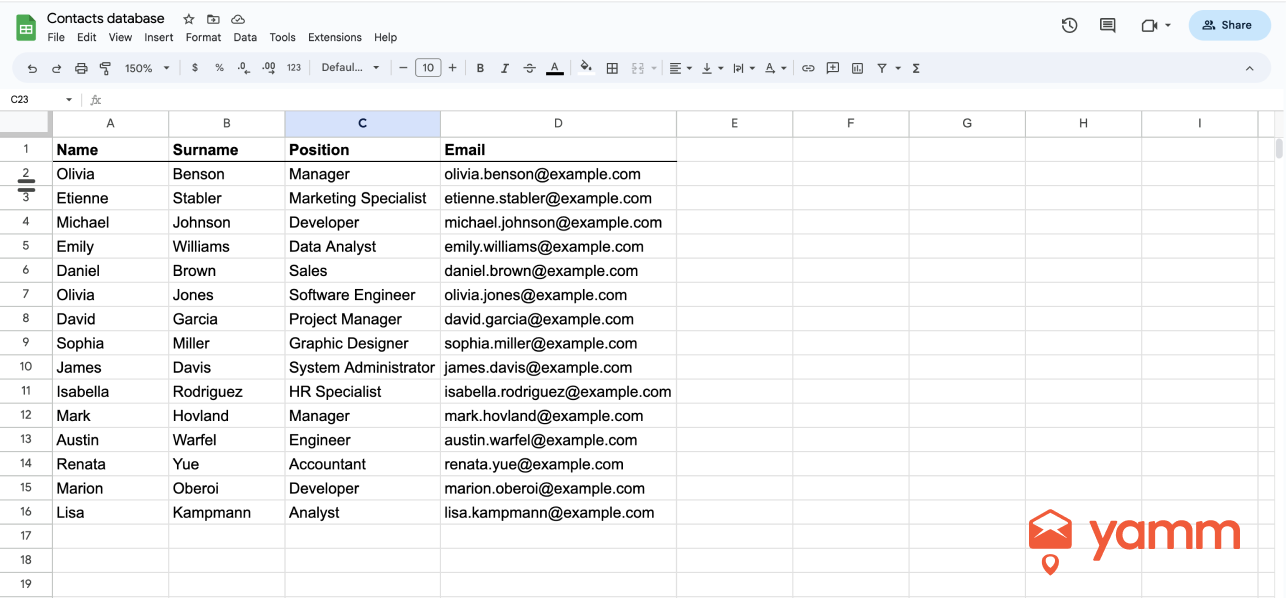
To create a proper Gmail merge sheet, follow these six steps:
- Create a Google Sheet with column names that correspond to the information you want to use in your personalized email messages. You can include columns for first name, last name, email address, company name, etc.
- Input data into the rows of the spreadsheet. Each row should represent a unique email recipient. Add any recipient-specific information, such as their email address and other custom fields that you want to use in the message.
- Ensure you have the correct email types and formats for your recipients. Make sure you have the appropriate email format for each contact, such as "firstname.lastname@email.com" or "firstname-lastname@email.com," if you are sending emails to a list of customers.
- Check the amount of emails you want to send. Depending on your mail merge tool and plan, there may be restrictions on the amount of recipients that you can email daily by mail merging.
- Segment recipients. If you have a large list of recipients, consider segmenting them based on specific characteristics such as location, industry, or interests. This helps send more relevant and targeted communications that are more likely to be opened and acted upon.
How to Add Recipients to the Mail Merge Sheet?
Follow these steps to add recipients to an existing mail merge sheet:
- Open your Gmail merge spreadsheet in Google Sheets
- Add a new row for each new recipient
- Format the data in each column. Make sure all recipient data is listed in a consistent manner.
How to Customize the Mail Merge?
To customize the mail merge, utilize the various tools and options in Google Sheets and Gmail. Custom mail merge allows the creation of highly personalized and targeted email campaigns that resonate with your audience and increase engagement and conversions.
Follow these steps to customize your mail merge:
- Use placeholders or markers to personalize the content of the email message for each recipient. For example, use the recipient's name, company, or any other information.
- Use varied fonts, colors, and formats. Make your emails visually appealing by using various fonts, colors, and formatting to highlight specific sections of interest.
- Use templates. Utilize pre-designed email templates or create your own template to save time and maintain consistency across your correspondence. With YAMM you can use Google Layouts templates directly in the Gmail editor.
- Add images and links. Enhance engagement and direct recipients to relevant content by incorporating images and links in the email message.
- Send with an alias. Select the alias that is most recognizable for your recipients and best for your branding.
- Personalize your attachments. Save time and reduce errors by automatically attaching relevant files to each recipient to a large number of people at once.
- Segment recipients to create personalized messages for each recipient group, increasing relevance and engagement.
How to Send Bulk Emails with Mail Merge?
To send bulk emails using mail merge, follow these seven steps:
- Create a draft in Gmail: Compose a new draft email in Gmail, including the subject line, email content, and any attachments. Send the email as usual.
- Set up a mail merge tool: Install a mail merge add-on in Google Sheets and connect it to your Gmail account.
- Import recipient list: Add the recipient list to the mail merge sheet. The list should include the receiver's email address and any other information you want to include in the email, such as their name or company.
- Customize the email: Use variables to personalize the message for each recipient. For example, include variables in the email body or subject line to insert the recipient's name or company.
- Preview and test: Review the emails and make any necessary changes. Ensure everything looks fine by sending a test email to yourself or a colleague.
- Start Mail Merge: Once ready to send the bulk emails, select your mail merge add-on and follow its mail merge procedure. Follow the instructions to select the draft email, recipient list, and other options, such as attachments.
- Send emails: Send the bulk emails through the add-on. The emails will be sent to each person on the list individually, with personalized text and attachments.
Today, email is the most widely used and effective means of communication. Businesses, organizations, and individuals use it to communicate with customers, members, and contacts. Many companies and organizations are looking for ways to reach a large audience with their marketing messages, announcements, and updates due to the growth of email marketing. This is where bulk emails come in handy.
Bulk email refers to the practice of sending numerous email messages to a list of recipients simultaneously. It is commonly used in email marketing and mass communication, where companies and organizations send promotional or informational emails to many members of their target audience. Mail merge features in email services like Gmail or specialized software or services, such as email marketing platforms, can be used to send bulk emails.
It is essential to follow best practices to avoid being marked as spam or violating anti-spam regulations when sending mass emails. This includes obtaining explicit permission from recipients before sending them emails, providing a clear opt-out mechanism, and avoiding spam language and tactics.
YAMM (Yet Another Mail Merge) is a popular Gmail mail merge add-on that allows you to send personalized bulk emails directly from Google Sheets. YAMM works in six steps:
- Create the Google Sheet: Create a new Google Sheet or use an existing one to enter recipient information in columns. Include names, email addresses, and any other custom fields you want to include in the email.
- Write the email in Gmail: Compose the email in Gmail and use YAMM's built-in merge tags to add custom fields to the email. For example, add a recipient's name, company, or any other information from the Google Sheet.
- Connect YAMM to Google Sheets: Install the YAMM add-on for Google Sheets and connect it to your Gmail account.
- Preview and test the email: Go through the email and make any necessary changes. Send a test email to yourself or a small set of recipients to ensure everything is working correctly.
- Start the mail merge: Select "Add-ons" > "Yet Another Mail Merge: Mail Merge for Gmail" > "Start Mail Merge" once you are ready to send the emails. Follow the instructions to choose the draft email, recipient list, and other choices, like attachments. Use YAMM's "Send Emails" button in Google Sheets to start the mail merge. YAMM will send personalized emails to each recipient on the list.
- Track email performance: Use YAMM's built-in tracking capabilities to monitor email performance. See who opened the email, clicked any links, and bounced back, and use this information to improve future campaigns.
How to Install and Authorize YAMM for Google Workspace?
Follow these seven steps to authorize YAMM (Yet Another Mail Merge) for Google Workspace:
- Open Google Sheets and select "Add-ons" from the menu.
- Choose "Get add-ons" and enter "YAMM" in the search field.
- Click "Install" next to the YAMM add-on to install it.
- After the installation is complete, select "Yet Another Mail Merge" > "Start Mail Merge" from the "Add-ons" menu.
- A pop-up window will appear, requesting permission to access your Google account. Click the "Allow" button to grant YAMM access to your Google account.
- The YAMM dashboard in Google Sheets will be displayed. Follow the on-screen instructions to grant YAMM access to your Google Workspace account and the necessary permissions. Here is the link to find YAMM from the Google Workspace Marketplace.
- After granting permission, use YAMM to send mail merge campaigns from Google Sheets.
Find more YAMM help to run your mail merge here.
Follow these seven steps to create an email template for mail merge:
- Open Gmail and click the "Compose" button to create a new email.
- Write the email's body text, making sure to include any custom fields you want to use for mail merges, such as the recipient's name or company.
- Use the appropriate markers to add custom fields.
- Personalize the email's layout and tone by including relevant images, links, and text formatting.
- Click the "More options" (three dots) button in the bottom-right corner of the compose window and choose "Templates" > "Save draft as template" > "Save as new template" to save the email as a draft or template.
- Give the template a descriptive and easy-to-remember name, such as "Sales Pitch" or "Monthly Newsletter."
- The email template has now been saved as a draft and is accessible by clicking the "Templates" button in the bottom-right corner of the compose window. You can create a new template, and existing ones can be modified or deleted.
How to Test the Email Template before Sending Bulk Emails?
Follow the steps below to test the email template before sending mass emails:
- Send yourself a test email. You can send yourself a test email before distributing it more widely. Launch your mail merge add-on, proceed as needed to create a mail merge, and when you are ready, you will have the option to send a test email first. If using YAMM, click the "Send a test email" button on the YAMM add-on panel to send a test email. If not using YAMM, use the relevant test email function in your email client or service. Using YAMM, you will be the sole recipient of this test email.
- Create a test recipient group by adding a few email addresses from your colleagues or friends to the mail merge sheet. Send the mail merge to those addresses only.
- Check the email for any formatting or content errors and ensure that any custom fields are populated with the recipient's data.
- Make any necessary adjustments to the email template, send more test emails to ensure everything is functioning correctly.
- Once you are confident that the email template is error-free, you can send the mail merge to the entire recipient list.
A test email is an email sent to the sender and/or a select group of recipients to evaluate an email campaign or template's effectiveness. This allows the sender to verify the email's layout, content, and functionality before distributing it to a larger audience. Test emails are typically sent to the mail merge sender or a small, representative sample of the overall email list to ensure that the email displays correctly on various devices and email clients, and that all personalized fields are accurately populated with recipient information. By testing emails before sending them to a wider audience, senders can identify any errors or issues and make necessary adjustments to enhance their email campaign's efficiency.
How to Use Mail Merge for Different Types of Emails?
Mail merge can be utilized to send various types of emails, depending on the campaign's purpose and target audience. These email types include emails such as welcome emails, promotional emails, transactional emails, and newsletter emails. Below are some ways to use mail merge for different types of emails.
- Mail merge for newsletter emails enables distribution of personalized and engaging newsletters to a large number of subscribers, incorporating dynamic content such as customized product suggestions based on previous purchases or articles based on recipients' interests or preferences.
- Mail merge for survey emails allows to tailor survey invitations and reminders for a large recipient list using personalized fields like the person's name and contact information, making surveys more interesting and personal.
- Mail merge for milestone and progress emails allows one to send customized updates and reminders to stakeholders or team members regarding a project’s progress using customizable fields like the recipient's name, task progress, and forthcoming deadlines or milestones. These emails help keep everyone informed and on track.
- Mail merge for promotional emails lets one customize and target marketing communications. Users can address a wide group of people by using customizable fields such as the recipient's name, prior purchases, or demographic information, increasing engagement and response rates.
- Mail merge for lead generation emails automates and personalizes the process of contacting prospective clients by adding customized information like the recipient's name, business, or industry, boosting response rates and conversion chances.
- Mail merge for discount emails sends personalized and automated discount offers to a large audience using specific information like the recipient's name or past purchase history, improving sales and promoting products or services.
- Mail merge for abandoned cart emails automates the sending of personalized emails to customers who left items in their online shopping carts, potentially increasing revenue and recovering lost sales.
- Mail merge for confirmation emails: Use mail merge to create personalized confirmation emails that enhance the customer experience and build trust.
- Mail merge for announcement emails delivers personalized and engaging emails to a large audience by adding customizable fields like the recipient's name, business, or other relevant information, increasing the likelihood they will be viewed and acted upon.
- Mail merge for transactional emails automates the delivery of personalized messages in response to specific activities or transactions, providing customers with information about their purchase, shipping instructions, and other relevant details.
- Mail merge for welcome emails customizes and automates the process of greeting new subscribers or customers with personalized information like the recipient's name and the date they subscribed or made a purchase.
1. Mail Merge for Newsletter Emails
Newsletter emails are a specific category of emails that are frequently sent, such as weekly or monthly, to a list of subscribers. The objective of these emails is to keep subscribers informed about updates, news, or other vital information regarding the company or organization distributing the email.
Mail merge is a valuable tool for sending newsletter emails, as it enables the sender to personalize each email for every person on their mailing list. By utilizing customizable fields, such as the subscriber's name or location, mail merge can automatically add these details to the email template.
There are various applications for newsletter emails, depending on the needs of the company or organization. Some typical types of email newsletters include company announcements, product/service promotions, industry developments, instructional materials, and customer testimonials.
The email's purpose, as well as the branding and message of the business or organization, can significantly influence the design and content of the newsletter email templates. Common components of a newsletter email template include a header featuring the company's logo, a table of contents or an overview of the email's content, articles with accompanying photos, text, and links, and contact information and social media connections in the footer.
Utilizing mail merge for newsletter emails offers several benefits, as it allows the sender to customize the email for each subscriber on their mailing list without needing to manually edit every individual email. This personalization enhances the recipient's experience, making it more engaging and tailored to their interests or needs. As a result, open and click-through rates are likely to improve. Furthermore, the process of sending newsletter emails to a large list of subscribers can be automated using mail merge, which saves time and resources. By streamlining this process, businesses and organizations can focus on other aspects of their operations while maintaining effective communication with their subscribers.
2. Mail Merge for Survey Emails
A survey email typically contains a link to a survey and is distributed to a group of people to collect feedback or data. These emails can be used for various purposes, such as market research, customer satisfaction surveys, employee input, and event organization.
Mail merge can be employed in survey emails to personalize the content with recipient-specific details like their name, company, or previous purchase history. This approach can help increase survey response rates, as customized emails are more appealing and more likely to be opened and responded to.
The purpose of a survey email is to gather insights or information from a group of people. Different email templates can be used based on the specific goal of the survey. For instance, a customer satisfaction survey may utilize a more approachable and engaging email style, while a market research survey may adopt a more formal and professional email template.
Using mail merge for survey emails is advantageous as it enables large-scale personalization. By customizing the email with recipient-specific data, the message becomes more engaging, thus increasing the chances of it being opened and answered. Additionally, mail merge helps save time and expenses by automating the process of sending survey emails to a large group of recipients.
3. Mail Merge for Milestone and Progress Emails
Milestone and progress emails are sent to individuals or groups to celebrate significant achievements, updates, or milestones. They can be used to express appreciation for a job well done, update stakeholders on project progress, or mark a milestone or anniversary.
Using mail merge in milestone and progress emails allows you to customize the content and enhance recipient engagement. This can be achieved by incorporating personalized fields, such as the recipient's name, project or milestone details, and relevant dates or accomplishments. By personalizing the email content, recipients are more likely to feel valued and interested in the achievement or milestone being celebrated.
Various templates can be used for milestone and progress emails, depending on the purpose. For example, a project update email template can include customizable fields for the project name, current status, upcoming milestones, and any risks or challenges. An anniversary email template can have unique fields for the recipient's name, the number of years or milestones being celebrated, and any special events or promotions.
Utilizing mail merge for milestone and progress emails is beneficial as it allows for the efficient distribution of customized emails to a large number of recipients, saving time and effort. Personalizing the email content increases the likelihood of a response or successful outcome, as recipients are more likely to engage with the content.
4. Mail Merge for Promotional Emails
A promotional email is a marketing communication sent to many people to promote a product, service, or event. The goal of a promotional email is to generate interest, increase sales or attendance, and direct people to a website or physical location.
Mail merge is a method for personalizing and customizing promotional emails for multiple subscribers. By using unique information such as the recipient's name, location, and purchase history, promotional emails can be personalized for each recipient, increasing the likelihood of engagement and conversion.
Promotional emails can serve various purposes, including promoting new products and services, offering discounts, advertising deals or events, soliciting customer reviews, and sharing company updates. The email templates for promotional emails can vary based on the campaign's purpose and target audience. Common components of promotional email templates include a short subject line, eye-catching images, a clear call-to-action, and personalized fields.
Mail merge for promotional email campaigns is beneficial because it allows for mass customization and modification. Personalizing promotional emails for each recipient using mail merge can help increase open rates and conversion rates. Automating the process of sending personalized promotional emails to a large list of recipients using mail merge can save time and resources.
5. Mail Merge for Lead Generation Emails
Lead generation emails are marketing messages sent to a specific audience to generate interest, gather information, and convert them into potential clients or leads. The aim of a lead generation email is to encourage readers to perform a certain action, such as filling out a form or seeking further details.
Mail merge can be employed to customize and tailor lead generation emails to a particular group of recipients. By including unique elements like the recipient's name, job title, and company information, lead generation emails can be personalized for each recipient, increasing the probability of engagement and conversion.
Lead generation emails can be used for offering free content in exchange for contact information, event or webinar invitations, surveys, feedback, showcasing products or services, and discounts and promotions. Email templates for lead generation emails will vary based on the campaign's purpose and target audience. Common elements of lead generation email templates include an engaging subject line, personalized introduction, clear call-to-action, and valuable content or offer.
Using mail merge for lead generation emails is beneficial as it allows for large-scale personalization and customization. Mail merge can help personalize lead generation emails for each recipient, improving engagement and conversion rates. Additionally, mail merge can save time and resources by automating the process of sending customized lead-generation emails to a specific set of recipients.
6. Mail Merge for Discount Emails
Discount emails are a type of promotional email that provides the recipient with a discount or exclusive offer. The goal of a discount email is to persuade subscribers to make a purchase or take advantage of a deal.
Mail merge can be employed to customize and tailor discount emails for a large group of subscribers. By leveraging specific information like the recipient's name, location, and purchase history, discount emails can be personalized for each recipient, increasing the likelihood of engagement and conversion.
Discount emails can be used for various purposes, such as promoting new products and services, encouraging existing customers to make additional purchases, and clearing surplus inventory to mark holidays or special events.
Email templates for discount emails typically feature eye-catching images, a clear call to action, and customizable elements such as the recipient's name and discount offer. Some templates may also incorporate a sense of urgency to encourage recipients to act quickly before the offer expires.
Using mail merge for discount emails is crucial as it allows for mass customization and personalization. Mail merge can help personalize discount emails for each recipient, boosting open rates and conversion rates. Moreover, mail merge saves time and money by automating the distribution of personalized discount emails to a large number of subscribers.
7. Mail Merge for Abandoned Cart Emails
Abandoned cart emails are automated messages sent to customers who have added items to their online shopping cart but did not complete the transaction. The purpose of abandoned cart emails is to remind customers of their incomplete transactions and encourage them to return to the website to finalize their purchase.
Mail merge can be used to personalize and customize abandoned cart emails using information such as the customer's name, the items left in their cart, and a personalized call-to-action. By utilizing personalization fields, emails sent to customers with abandoned carts can be customized to improve conversion rates.
Abandoned cart emails have several purposes, including reminding customers of unfinished purchases, offering customers a discount or incentive to purchase, assisting customers in completing purchases with additional information or support, and encouraging shoppers to return to the website to explore more products.
Email templates for abandoned cart emails will vary depending on the campaign's purpose and target audience. Common elements of abandoned cart email templates include a compelling subject line, a personalized message, a clear call to action, and a reminder of the items left in the cart.
Using mail merge for abandoned cart emails is ideal as it enables large-scale customization and personalization. Mail merge can help personalize emails sent to customers with abandoned carts, increasing the likelihood of conversion. Additionally, mail merge can save time and resources by automating the process of sending personalized emails to a large number of customers with abandoned carts.
8. Mail Merge for Confirmation Emails
A confirmation email is a transactional email sent to a customer or user after completing an action or transaction, such as making a purchase, subscribing to a service, or registering for an event. The purpose of a confirmation email is to confirm the transaction details and provide relevant information to the customer.
Mail merge can be used to create and personalize confirmation emails sent to a large number of recipients. By using unique elements like the recipient's name, transaction details, and other relevant information, confirmation emails can be customized for each recipient to ensure accuracy and enhance the customer experience.
Confirmation emails can be used for various purposes, including order confirmation, reservation confirmation, subscription confirmation, event or webinar registration confirmation, and password reset or update.
Confirmation email templates should be simple, concise, and informative. Common elements of confirmation email templates include transaction details, relevant dates and times, customer support information, and a call-to-action if necessary.
Using mail merge for confirmation emails is beneficial as it enables large-scale customization and personalization. Mail merge can help personalize confirmation emails for each recipient, ensuring accuracy and improving the user experience. Furthermore, mail merge can save time and resources by automating the delivery of personalized confirmation emails to numerous recipients.
9. Mail Merge for Announcement Emails
Announcement emails are a type of email sent to a group of recipients to inform them of a specific event, news, or update. The purpose of an announcement email is to disseminate information and keep recipients informed.
Mail merge can be employed to personalize and customize announcement emails for a large group of recipients. By using personalized information like the recipient's name, company or organization, and job, announcement emails can be tailored to each specific recipient, increasing engagement and understanding.
Announcement emails can be used for various purposes, such as organizational news, product launches or updates, changes in business hours or location, employee promotions, and charity fundraisers. Email templates for announcement emails will vary depending on the campaign's purpose and audience. Common elements of announcement email templates include a clear subject line, appealing images, a brief summary, and customizable fields.
Using mail merge for announcement emails is beneficial as it allows for large-scale personalization and customization. Mail merge enables announcement emails to be personalized, increasing engagement and comprehension. Additionally, mail merge automates the delivery of customized announcement emails to a large group of subscribers, saving time and money.
10. Mail Merge for Transactional Emails
Transactional emails are automatically sent in response to a specific action or transaction, such as purchase confirmation, shipping notification, password reset, or account activation. The purpose of a transactional email is to provide crucial information or updates about a specific transaction or action.
Mail merge can be used to personalize and tailor transactional emails for specific recipients. By using customizable fields such as the recipient's name, order number, or transaction data, transactional emails can be adapted to each individual recipient to convey relevant and important information.
Transactional emails can serve various purposes, including purchase receipts and shipping notifications, password resets and activations, subscription renewals, and support and services.
Transactional email templates emphasize clear, concise language and provide relevant information. Common elements of transactional email templates include customizable fields, concise subject lines, and strong calls to action.
Using mail merge for transactional emails is beneficial as it enables recipient-specific customization and personalization. Mail merge can help personalize transactional emails, enhancing customer engagement and satisfaction. Additionally, mail merge automates the delivery of transactional emails, saving businesses time and money.
11. Mail Merge for Welcome Emails
A welcome email is a message sent to new subscribers or customers after they sign up for a service or make a purchase. The goal of a welcome email is to introduce the recipient to the company or organization, provide relevant information, and make a positive first impression.
Mail merge can be used to personalize and automate the process of sending welcome emails to new subscribers or customers. By including unique information such as the recipient's name, location, and purchase history, welcome emails can be tailored to provide a more engaging and personalized experience for the recipient.
Companies use welcome emails for various purposes. Typical goals of welcome emails include introducing the company or organization, offering a welcome discount, directing recipients to appropriate resources, soliciting feedback, and promoting social media engagement.
Welcome email designs will vary by business and purpose. Common elements of welcome email templates include a personalized greeting, a brief introduction to the company or organization, a clear call to action, and valuable resources.
Using mail merge for welcome emails is beneficial as it enables large-scale personalization and automation. Mail merge allows new subscribers or customers to receive personalized welcome emails instantly. Additionally, mail merge automates the delivery of personalized welcome emails to multiple subscribers, saving time and money.
The following are some common mistakes often made during the mail merge process:
- Issues with formatting: Formatting errors are quite common in mail merge documents or email templates. These could include problems with alignment, spacing, font changes, or any other formatting discrepancies. Formatting errors are particularly problematic when they pertain to placeholders. If the placeholders in the mail merge document do not match the field names or data columns in the data source or data file, errors can occur during the mail merge process. This can result in emails containing content or formatting errors and make a bad impression on your recipients.
- Use of incorrect data: Another frequent mistake is using inaccurate data in the mail merge sheet or email template. This can result in emails containing incorrect information such as misspelled names or wrong contact details, which may be sent to unintended recipients.
- Absence of personalization: Mail merge allows for customization, but sometimes users fail to take advantage of this feature. Sending generic emails without any personalization can lead to low engagement and high unsubscribe rates.
- Lack of proofreading: It is essential to proofread the email before sending it to ensure there are no grammatical or spelling errors. Not proofreading the email can create a negative impression and impact the overall success of the campaign.
- Overusing mail merge: Some users tend to overuse mail merge, resulting in sending an excessive number of emails to the same recipient in a short timeframe. This can lead to high unsubscribe rates and negatively affect the sender's reputation.
Below are the benefits of using mail merge for email marketing.
- Efficiency: Mail merge streamlines the process of sending customized emails to numerous recipients, making it a time-saving solution in email marketing. This allows you to send emails to hundreds or thousands of individuals simultaneously without having to individually tailor each message.
- Increased precision: By automating the process of sending tailored emails, mail merge improves accuracy by reducing the chances of errors that may occur when manually customizing messages. This ensures that the appropriate message is sent to the right recipient at the right moment.
- Customization: One of the main advantages of using mail merge in email marketing is the ability to personalize communications. You can use mail merge to modify the content of your emails by incorporating custom fields such as the recipient's name, company, or location. Personalization increases the engagement and response rate of email messages.
- Affordability: Mail merge is a cost-effective email marketing strategy, as it allows you to send personalized emails to multiple recipients simultaneously without incurring the expenses of manual customization or hiring additional staff. This is an ideal option for small businesses or individuals looking to launch cost-effective email marketing campaigns.
- Enhanced monitoring: Mail merge allows you to track the success of your email campaigns by providing statistics on open rates, click-through rates, and other essential metrics. This information helps you identify which emails are resonating with your target audience and make data-driven decisions to improve your email marketing strategy.
Below are some alternatives to mail merge:
- Custom landing pages: Instead of mail merge, you can create unique landing pages for each email recipient by using technologies like Unbounce, Instapage, and Leadpages. Customized landing pages allow you to tailor your website's content for each individual visitor, improving user experience and increasing conversion rates.
- Personalized video messages: Video emails can be a great alternative to traditional email marketing and can be customized using applications like Vidyard, Loom, and Hippo Video. Personalized videos can help you stand out in a crowded inbox and increase audience engagement.
- Email templates: If you only need to send a small number of personalized emails, you can save time by using email templates instead of customizing each message individually. This method can be time-consuming for larger campaigns but is suitable for small businesses with a limited number of contacts.
- CRM software: Customer Relationship Management (CRM) software, such as Salesforce, Hubspot, and Zoho, can help you manage your email marketing campaigns and personalize communications for each contact in your database. These platforms often integrate with email marketing tools to streamline the process.
- Email marketing software: Tools like Mailchimp, Constant Contact, and Campaign Monitor offer email automation and personalization features that can eliminate the need for mail merge. These tools allow you to create customized email campaigns using pre-built templates and drag-and-drop editors.